A workflow-first buying guide that follows approved context into a reviewable artifact, then identifies the person and systems required to put it into production.
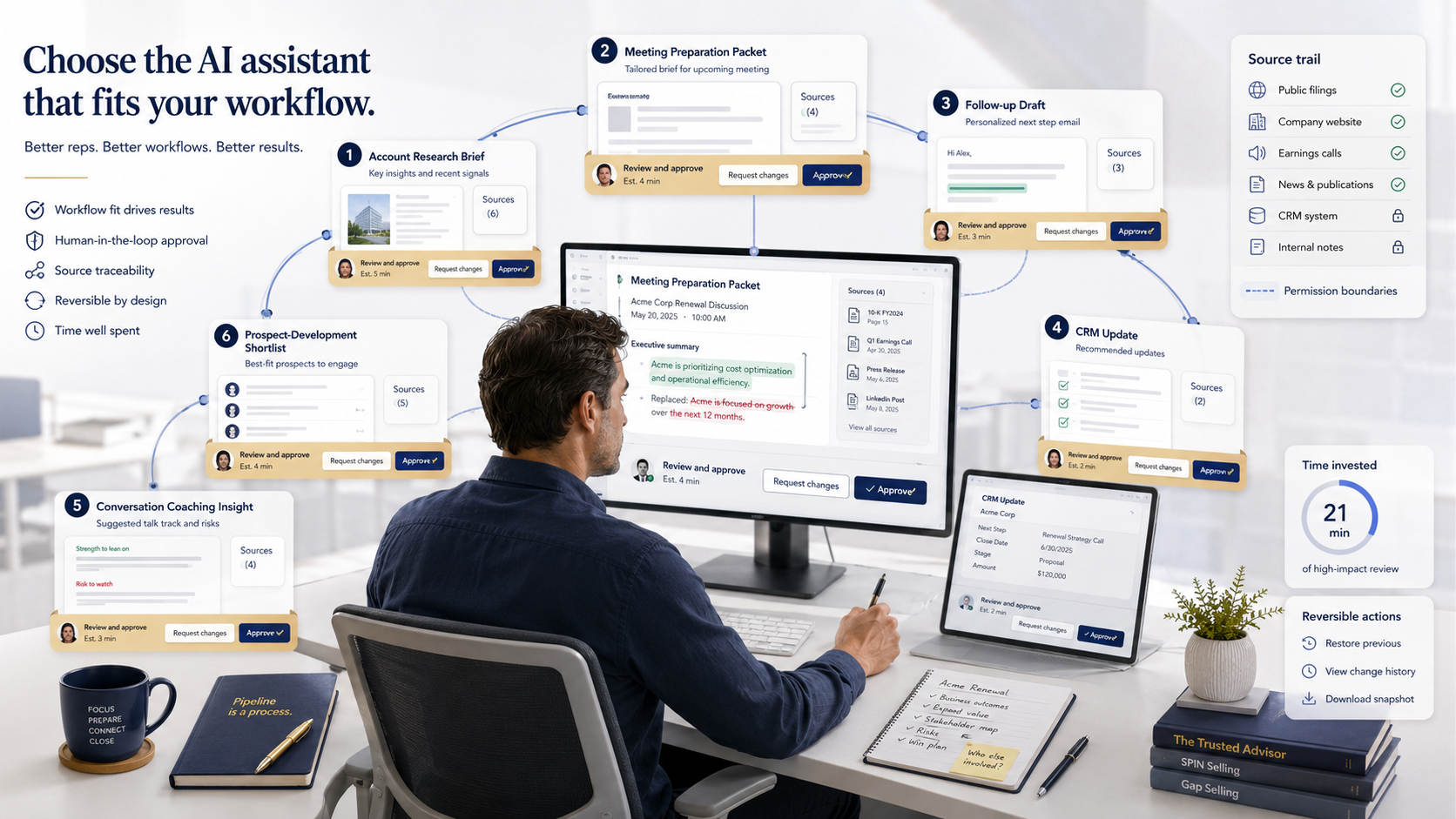
Start with the rep work queue
The category becomes useful when the noun disappears. Replace “AI sales assistant” with the action a rep repeats: prepare a meeting, research an account, draft a follow-up, update an opportunity, review a call or inspect forecast risk. Then name the trusted context, the artifact the rep receives, the approval action and the required integrations. A product that spans many columns is not automatically the best fit; it may simply demand a larger implementation surface.
| Platform and best fit | Primary rep workflow | Input context | Output artifact | Approval point | Implementation dependency |
|---|---|---|---|---|---|
| Microsoft Sales agent — Microsoft 365-centered selling | Meeting prep, account research and drafting | Dynamics 365 or Salesforce records plus Microsoft 365 context | Account or opportunity answer, meeting brief and email draft | Rep verifies facts and chooses the next action; exact write behavior depends on the configured mode | Microsoft 365 Copilot, installed Sales agent, supported CRM and admin-selected fields |
| HubSpot Breeze — meeting-to-follow-up loop | Prepare, capture, draft and update | Smart CRM, calendar, meeting transcript and deal context | Brief, notes, action items, follow-up draft and suggested CRM changes | Rep reviews notes, confirms actions, sends the draft and applies record changes | HubSpot CRM context, calendar connection and enabled meeting capture |
| Salesforce Agentforce Sales — CRM-native opportunity work | Research, prioritization, coaching and CRM updates | Salesforce records, conversations, web and connected data | Prioritized list, brief, outreach draft, coaching feedback or suggested field update | Use suggestive mode to review, edit and approve material opportunity changes | Salesforce data model, permissions, configured actions and optional Data 360 context |
| Gong — conversation-led coaching and deal execution | Review calls, coach and follow up | Captured calls, meetings, emails, notes and CRM context | Transcript, summary, draft email, coaching suggestion and deal-risk signal | Rep owns outgoing communication; manager interprets coaching and deal signals | Capture consent and sources, CRM integration, admin data controls and scoring criteria |
| Clari Copilot — conversation-to-pipeline and forecast context | Live call guidance, CRM capture and forecast inspection | Conversation transcript, buyer signals and Clari revenue context | Battlecard, captured next step, CRM data and pipeline or forecast signal | Rep or RevOps validates next steps and forecast implications; detailed approval mechanics need verification | Meeting capture, CRM integration and the broader Clari revenue platform for full context |
| OKKI Go — prospect research and reviewed drafting | Find accounts and contacts, shortlist, then draft outreach | ICP, product or website context, visible search results and supplied materials | Candidate list, unlock plan, contact list and localized outreach draft | User selects accounts, confirms unlock and approves recipient, subject and body before send | Supported AI-agent environment, OKKI Go access and reviewed result or unlocked-contact context |
Meeting context into a usable follow-up
Meeting assistance is a chain, not a summary button: retrieve the right account context, prepare the rep, capture what happened, draft the follow-up and propose record changes. Microsoft and HubSpot both touch that chain, but their natural homes differ. Microsoft reaches across Microsoft 365 and a supported CRM; HubSpot keeps the loop close to Smart CRM and its meeting capture. Buy the chain that matches where reps already work and where review must occur.
Microsoft Sales agent — when Microsoft 365 is the rep workspace
Microsoft Sales agent is the natural fit for sellers whose day already runs through Microsoft 365. With a supported Dynamics 365 or Salesforce connection, it can combine CRM records with Microsoft Graph and meeting context to answer account questions, summarize opportunities, prepare meetings and draft email. What appears still depends on administrator-selected fields, sharing prompts and deployment mode, so the rep should verify the source and facts before acting; the reviewed documentation does not describe one universal CRM-write path. This is also the heaviest prerequisite stack in the meeting group: Microsoft 365 Copilot, an installed Sales agent and a configured CRM all have to line up. Test a case where a recent email contradicts the record and require the interface to show which source shaped the result.
HubSpot Breeze — when the meeting should close the CRM loop
HubSpot Breeze is more cohesive when the desired result is a closed meeting loop inside HubSpot: prepare from Smart CRM and calendar context, capture what happened, then turn the transcript and deal history into notes, action items, a follow-up draft and suggested record changes. The official workflow keeps the rep at the consequential moments—reviewing notes, confirming actions, sending the message and applying CRM properties. That loop is only as complete as the connected calendar, enabled capture and underlying records. In a pilot, give the system a transcript that conflicts with an existing property and see whether the rep can tell evidence from inference, reject that one change and keep the useful follow-up work.
CRM context into an opportunity action
CRM-native assistance can change the record that later drives reporting, routing and forecast inspection. That makes source context and approval mode more important than a polished summary. The evaluation should begin with field ownership, terminal states and employee permissions, then test whether the source behind each suggested or autonomous change remains visible.
Salesforce Agentforce Sales — when Salesforce owns the action
Salesforce Agentforce Sales deserves consideration when Salesforce itself owns the work: prospect prioritization, account research, outreach drafts, coaching or opportunity updates. It can draw on Salesforce records and configured conversation, web, third-party or Data 360 sources, then return anything from a prioritized list and brief to a draft or structured field update. Salesforce documents both suggestive and autonomous modes; suggestive mode is the sensible starting point because a rep can review, edit and approve material changes, while quote actions inherit the employee's permissions. Production fit therefore depends on a governed data model, explicit field ownership and configured actions. Ask the administrator to trace a conversation-derived update and prove it cannot overwrite a rep-owned stage or next step without the chosen approval.
Captured conversation into coaching and deal execution
Conversation intelligence begins before the model: calls, meetings and emails must be captured under the right consent, identity and retention rules. It ends after the output: a manager still decides whether a pattern is coachable, and a rep still owns the outgoing follow-up. This loop should be evaluated on traceability from source moment to suggested action.
Gong — when the conversation is the primary evidence
Gong becomes useful when the conversation itself is the evidence base. Recorded calls, meetings, emails, notes and connected CRM context can feed transcripts, summaries, suggested follow-ups, email drafts, coaching guidance and deal-health signals. That breadth serves both reps and enablement teams, but it does not transfer judgment to the model: the rep still owns the message and next action, and the manager must interpret coaching or risk in context. Reliable capture, CRM integration, administrative data controls and agreed coaching criteria are prerequisites rather than cleanup work. During the pilot, follow a coaching suggestion and a deal alert back to the exact interaction moment and confirm that the reviewing manager is permitted to see it.
Buyer signals into pipeline and forecast inspection
Forecast assistance is downstream of data capture, CRM hygiene and sales judgment. A buyer signal extracted from a conversation may be useful, but it should not silently become a stage, amount or commit decision. The pilot must retain the source passage and show who accepted the next step before the signal enters pipeline inspection.
Clari Copilot — when conversations must feed revenue context
Clari Copilot fits teams already running Clari revenue workflows and looking to connect calls with pipeline, forecast and execution context. Real-time transcripts and buyer signals can surface live battlecards, capture intent and objections, record next steps in CRM and inform later pipeline inspection. The broader value depends on meeting capture, CRM integration and the rest of the Clari platform; without that revenue context, Copilot is closer to a conversation tool than a forecast assistant. The reviewed overview is also less explicit about granular approval mechanics, so reps and RevOps should keep ownership of next steps and forecast implications. Introduce a disputed buyer signal and verify that it can be traced, corrected and withheld from forecast judgment until someone accepts it.
Product context into a reviewed prospecting artifact
Prospecting assistance starts before a CRM opportunity exists. The useful artifacts are intermediate: a buyer route, candidate companies, an unlock decision, contact rows and a draft. That makes visible selection gates a feature of the workflow, not friction to hide. It also means the product should not be credited with post-send reply, CRM or forecast work that its official use case does not document.
OKKI Go — when the rep needs research before outreach
OKKI Go addresses an earlier, narrower part of the rep workflow: turning an ICP, product description or website into company search, reviewing visible candidates, finding contacts and drafting local-language outreach. Target countries and roles, exclusions, selected companies and optional catalog material shape the work; the useful outputs are a candidate list, ranking rationale, unlock plan, contact rows and a draft. The user remains visibly in control by selecting companies, confirming unlock and approving the recipient, subject and body before anything is sent. It also requires a supported AI-agent environment, OKKI Go access and reviewed result or unlocked-contact context. The cited page does not extend this workflow to autonomous replies, CRM updates, coaching or forecasting, and the comparison does not credit it with those jobs.
Map implementation dependencies before the demo
The same assistant can look excellent in a prepared demo and fail in production because the calendar is incomplete, the CRM owner is stale, calls are not captured, restricted fields are exposed or no one owns approval. Draw the dependency chain before evaluating output quality. The product should fail visibly when context is missing instead of filling the gap with an unsupported inference.
| Dependency | Decision to make | Failure case to test | Named owner |
|---|---|---|---|
| Source system | Which CRM, email, calendar, call and web data may be used | A required source is missing or conflicts with another | Sales operations or data owner |
| Identity and permissions | Which user's access governs retrieval and action | A restricted field or account appears | IT or security administrator |
| Capture | Which meetings, calls and emails enter the workflow | A conversation is absent, duplicated or attached to the wrong account | Revenue operations |
| Artifact destination | Where briefs, drafts, tasks and field suggestions appear | A rep cannot find or correct the output | Workflow owner |
| Approval | Who may send, apply, accept or override | An action occurs without the expected reviewer | Sales manager |
| Audit and rollback | How source, edit, acceptance and system change are reconstructed | A bad CRM update cannot be reversed | CRM administrator |
- If CRM, email and transcript context conflict, narrow the allowed source set and name one authoritative field owner before rerunning the case.
- If retrieval, generation and action inherit different permissions, reduce the action scope to the least-privileged identity and retest access boundaries.
- If a rep cannot correct the artifact without losing its source trail, redesign the artifact and review interface before adding users.
- If a send or record change lacks a logged approval event, keep that action in suggestive mode.
- If an incorrect downstream action has no named reverser or audited repair path, stop automation of that action.
Run a fourteen-day workflow pilot
A useful pilot holds the workflow still long enough to learn where the assistant helps and where it creates review work. Choose one repeated action, freeze the permitted context and assign one reviewer. The team can then compare accepted, corrected and rejected artifacts without mixing meeting, drafting, CRM and forecast jobs. Failure cases matter because missing or conflicting context reveals whether the workflow degrades visibly or invents a confident answer.
| Measure | What it reveals | Expansion rule |
|---|---|---|
| Accepted, corrected and rejected artifacts | Whether the output saves work or merely moves it to review | Expand only a stable artifact type |
| Unsupported or stale facts | Whether context is sufficient and traceable | Hold scope until source failures are visible |
| Median review time | Whether the approval point fits rep workflow | Redesign the artifact before adding users |
| Downstream repairs | Whether sends, tasks or CRM changes create hidden cleanup | Do not automate the action while repairs persist |
| Permission and wrong-account failures | Whether identity and record boundaries hold | Stop the pilot on any uncontained exposure |
Name the rep action, lock the approved context, define the artifact and assign one approval verb. The assistant earns broader use only after that loop stays traceable under normal and failure cases.
Frequently asked questions
What is an AI sales assistant?
It is software that helps a seller perform a defined action using approved business context and produces an artifact such as a brief, draft, CRM suggestion, coaching signal or forecast input for review.
Which AI sales assistant is best?
The best fit is the one closest to your workflow and system of record. Microsoft, Salesforce and HubSpot fit different productivity and CRM environments; Gong and Clari begin with captured conversations; OKKI Go specializes in prospect research and reviewed outreach.
How is an AI sales assistant different from an AI SDR?
An assistant normally produces or recommends work for a rep to review. An AI SDR may own a connected outreach loop, so it requires explicit send, reply, stop, handoff and CRM-state controls.
What should a pilot measure?
Measure accepted, corrected and rejected artifacts, unsupported facts, review time and downstream repairs. Also test missing sources, conflicting records, restricted data and wrong-account context.
Why do implementation dependencies matter?
Meeting capture, CRM quality, permissions and artifact destination determine what context the assistant can use and whether a rep can safely approve the result. A strong demo cannot compensate for a broken dependency chain.