
Design a sequence that changes when the prospect state changes, fits the team that must run it, and teaches you something when results arrive.

Frame the operating hypothesis before you schedule it
Your calendar can look complete—calls, emails, social tasks, reminders—and still fail the first real reply. What happens when you receive a referral, a firm no, an out-of-office message, or a request to stop?
If your plan can't answer those questions, it isn't a cadence yet; it's a dated queue. Treat the cadence as a bounded hypothesis about audience, message jobs, observable states, allowed next actions, and the point where contact ends, then add timing.
Choose one audience and one conversion
Start with one campaign population, not everyone who resembles your ideal customer profile. Write down geography, company condition, relevant role, inclusion evidence, exclusions, and freshness so you can explain why each record belongs.
Now define the conversion you want. Is it a referral to the right owner, a product evaluation, or an accepted meeting? Sample identity, role relevance, suppression, and inclusion evidence before launch, and give someone authority to reject or repair uncertain records.
Write channel and capacity limits
For every channel, write its job, owner, required information, and disabling condition. Don't treat compliance as a generic checkbox: ICO B2B guidance shows that obligations vary by channel, recipient type, personal-data use, transparency, and objections, while your markets still require their own legal review.
Next, count your available research, message, call, and reply-handling time, with room for exceptions. A plan that consumes all nominal capacity before replies arrive is already overloaded, so protect response work and release records only while review and stop handling remain reliable.
Sequence different message jobs
Sequence informational jobs, not merely channels. Your opening might establish relevance and test the role; a call might explore responsibility; a follow-up might answer one uncertainty or offer a correction path.
Ask beside every touch, “What could you know afterward that you didn't know before?” If the answer is nothing, remove it; repeating the same proposition under a new subject line creates activity, not learning, and your useful jobs should determine sequence length.
Choose a channel only when it can perform that job for this audience. Email can carry a concise, reviewable claim; a live call can resolve role ambiguity; appropriate professional social activity can establish context, but availability, permission, buyer behavior, representative skill, or record quality may rule any channel out.
Order dependencies before dates. If your call relies on a document, send the document first; if you receive a referral, record it before contacting the new person, and leave enough space for the buyer to process the last job and for your team to capture state.
Separate preparation from permission to send
You can reduce preparation work without handing over the commercial decision. In the documented OKKI Go workflow, selected company context and your product material go in, a draft comes out, and a person confirms the recipient, subject, and body before sending.
You still need to check facts, role relevance, applicable requirements, and the reason for contact. If your team can't review those items at the planned rate, lower the cohort size; useful automation preserves inspection and visible state instead of accelerating unchecked sending.
Turn every response into an owned branch
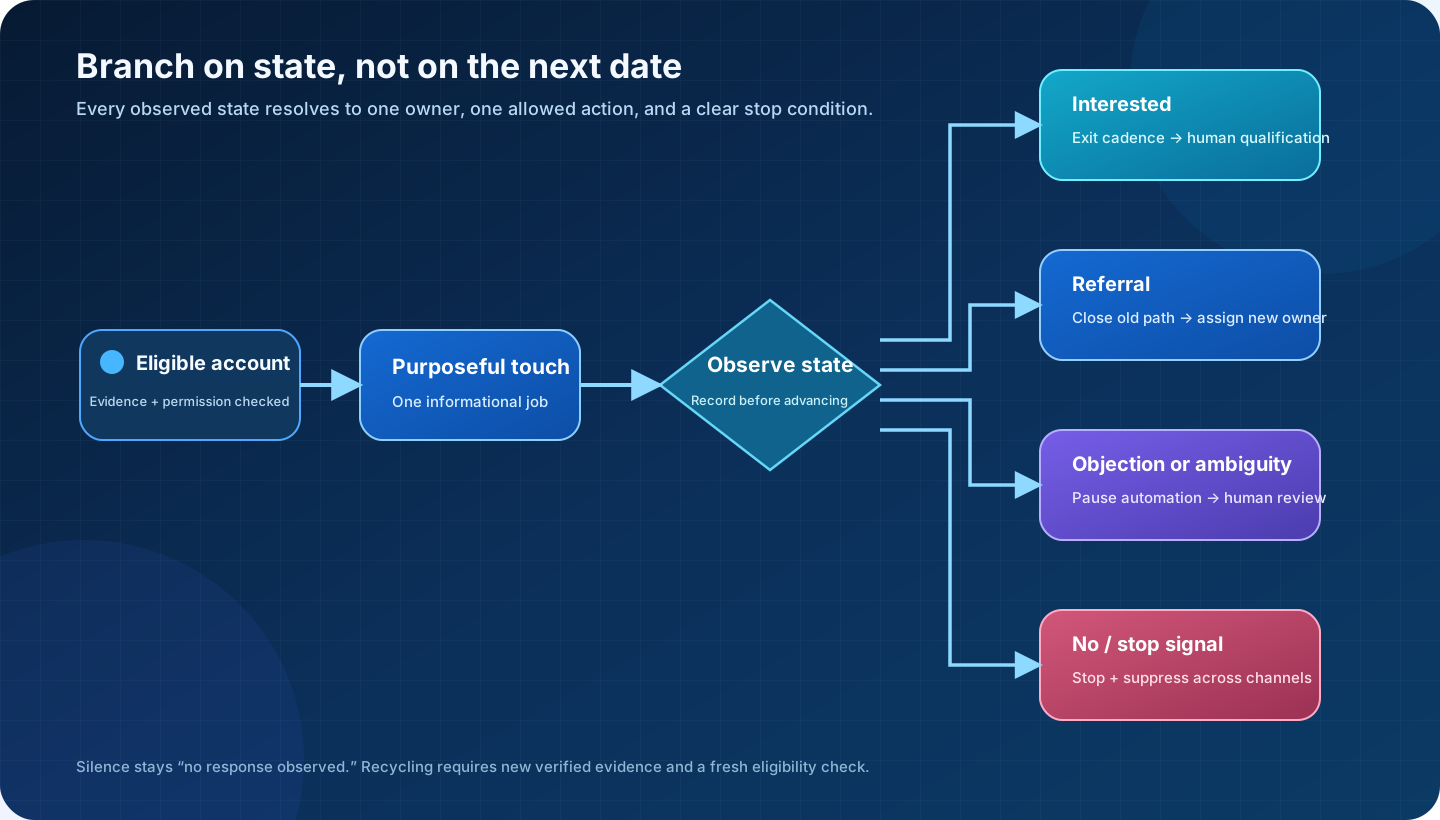
After every action, put the record into a state that changes what you may do next. An interested reply exits to human qualification; a referral closes the original path, records a new owner, and prevents your team from contacting both people at once.
A substantive objection should pause automation for review, while a clear no or applicable stop signal should suppress further action. Keep silence as “no response observed,” not imagined interest or rejection, and borrow Salesforce's distinction among status, assignment, conversion, and history to make your routing reconstructable.
Stop, pause, or hand off on explicit signals
Write terminal rules your team can apply without guessing. For a stop, name the signal, suppression scope, record location, and person who verifies cancellation across channels; for a pause, name the reason and evidence needed to resume; for a handoff, name the new owner and what automation must cease.
Then test those rules with seeded records before launch. Can you place a stop in one channel and make the others disappear, change ownership and block the old owner, and route an ambiguous reply to a person rather than an invented branch? Precise duties still depend on jurisdiction and recipient.
Recycle only when new evidence changes the case
Recycling doesn't mean restarting the same sequence after a quiet interval. Ask what materially changed: a verified role change, relevant company event, requested future date, different offer, or corrected contact record? Preserve your prior attempts and closure reason.
Before re-entry, rerun eligibility, freshness, suppression, and capacity checks, then choose the message job that fits the new state. If you can't name new evidence, keep the record closed; duplicated contact isn't market learning.
Rehearse the branch load on your real calendar
Rehearse a bounded cohort on paper. Place research, personalization, call work, reply review, exceptions, manager review, and data correction on your real calendar, then stress the plan with positive replies, clustered referrals, unavailable call coverage, or a paused list.
You're not predicting a response rate; you're locating the load at which someone would skip review, delay a handoff, or release another touch before recording state. Reduce cohort size until the sequence survives those cases, because capacity-bounded timing is a service decision, not decoration.
Protect the reply and exception queue
Put live state changes ahead of new activity. Give your campaign a suitable review window and named backup, and don't borrow that time for research just because today's queue looks quiet.
Before each release, check unresolved replies, referrals, stop requests, failed sends, and records awaiting correction, then pause entry when the queue exceeds safe review capacity. Scheduling can reduce coordination, but your factual claims, ambiguous replies, channel eligibility, recipient choice, and final approval remain human decisions wherever the workflow or risk requires them.
Launch a bounded experiment and adapt from evidence
Read your cadence as a set of transitions. Delivery and failure records tell you whether an attempt could proceed; right-party reach tests contact selection and channel choice; qualified replies show whether the message opened a relevant conversation under your team's definition.
Keep each count and rate beside cohort, segment, channel, message job, owner, and observation window. Don't let opens or clicks stand in for buying intent, and don't let meeting totals hide cancellations, wrong-person bookings, or capacity cost; use the measure nearest your tested variable and retain downstream quality as a guardrail.
Record what the system observed, not what you hope
Operational visibility helps only when you interpret it modestly. In the documented OKKI Go workflow, the human-confirmed recipient, subject, and body go in; send status or a failure reason comes out; a person reviews the record and decides whether correction is needed.
Store the raw state, timestamp, classification rule, and later human action so you have an auditable attempt record. It can expose a workflow problem, but it can't establish purchase intent, inbox placement, lawful basis, or revenue impact, so keep speculation about the buyer's mind off your operational dashboard.
Design a one-variable experiment
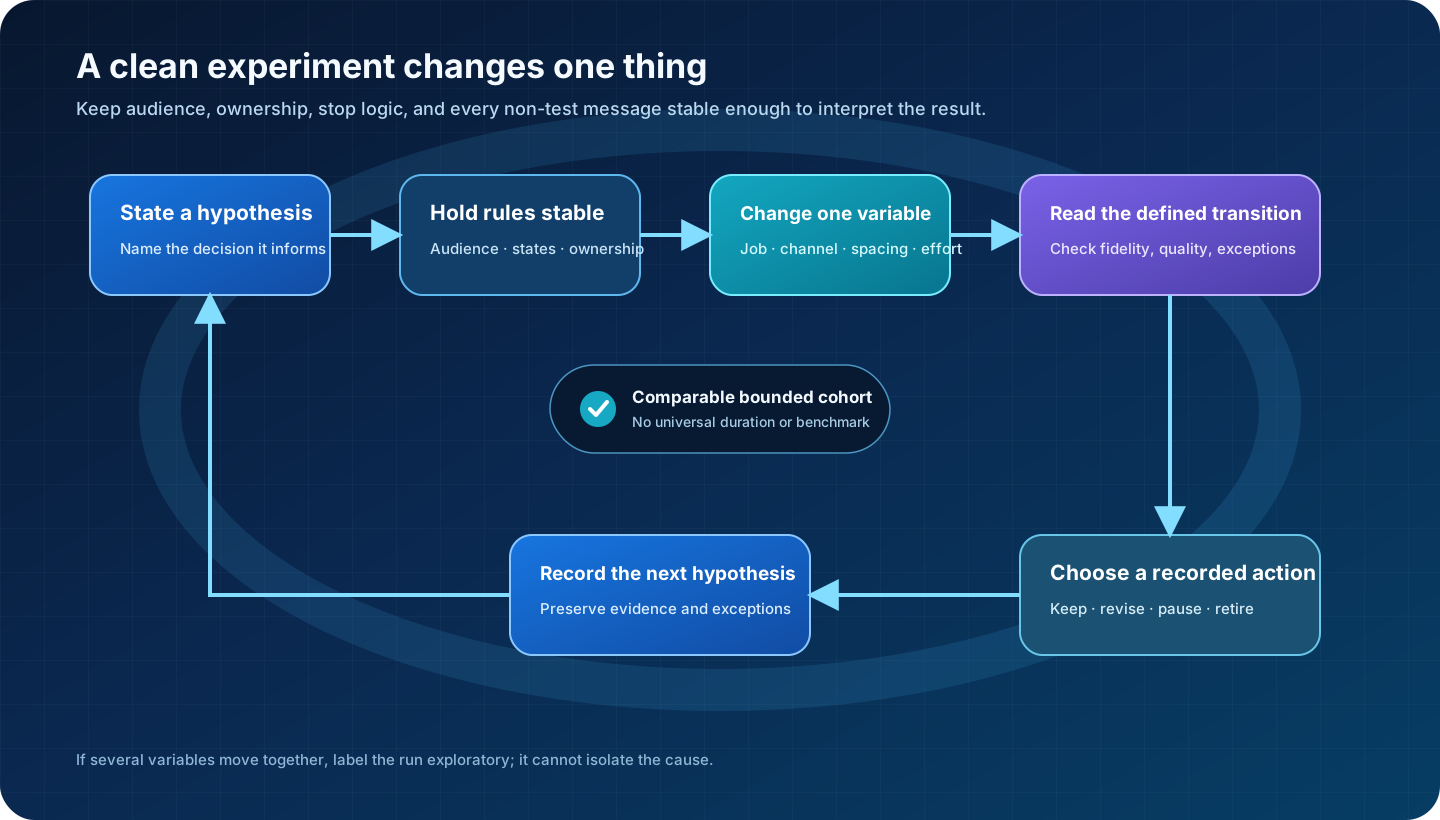
What decision must your next run inform—message clarity, channel contribution, spacing for state capture, or the value of manual research? State the hypothesis and diagnostic measure before launch, then hold audience, eligibility, other messages, ownership, and stop logic stable while you change only that variable.
Use comparable cohorts and an observation window suited to the state you're measuring, without importing a universal duration. Review data quality, execution fidelity, and exceptions, then keep, revise, pause, or retire the change; if several variables moved, call the run exploratory rather than claiming you isolated a cause.
Diagnose the earliest break before adding touches
When results disappoint, don't add calendar cells. Start with the earliest broken transition: failed attempts point toward contact data, channel setup, or handling; right-party reach with few qualified replies points toward your audience or message job; useful conversations with weak handoffs point toward goal, qualification, scheduling, or ownership.
Ask whether your messages were approved, calls completed, replies classified, and stop rules propagated. Your cadence can't teach you when the designed and executed sequences differ, so repair that first break and rerun a bounded test instead of changing every stage.
| Observed pattern | First question | Correction to test |
|---|---|---|
| Many failed attempts | Were identity, freshness, channel setup, and restrictions checked? | Repair the list or channel operation while holding the message stable. |
| Right people reached, few qualified replies | Did the opening message perform one clear informational job? | Revise audience-to-message fit without extending the sequence. |
| Useful replies, weak handoff | Are conversion definitions, owners, and response windows explicit? | Repair routing and qualification before changing outreach. |
| Overlapping or unwanted contact | Did branch, pause, and stop states propagate across channels? | Fix state synchronization and suppression before relaunch. |
Take one planned campaign and remove its dates for an hour. Write the audience, message jobs, state branches, stop and recycle rules, ownership, and capacity first. Restore timing only after the path is executable, then run one bounded cohort with one variable deliberately changed.
Frequently asked questions
How many touches should an outbound sales cadence include?
Use only as many touches as have distinct informational jobs and can be executed within the team's review capacity. Audience, market, channel permissions, buyer context, and message purpose change the answer, so no count is universal.
How long should an outbound sales cadence run?
Choose spacing from buyer context, channel role, time needed to record state, and team capacity. The cadence ends when its useful message jobs are complete or a stop condition occurs, not when a borrowed template reaches its final day.
What channels should the cadence use?
Include a channel only when it performs a distinct job for the audience, the team can execute it competently, the required data is fit, and market-specific legal and operational checks permit its use.
When should a prospect be recycled?
Recycle only when new, verified evidence changes the reason for contact or corrects the previous record. Recheck eligibility, suppression, freshness, and capacity, and retain the old history so the next action does not repeat it blindly.
Which metric matters most when testing a cadence?
Use the metric closest to the variable being changed, then keep downstream quality as a guardrail. A channel-operation test may use delivery states; a message-job test may use qualified replies; neither alone proves pipeline or revenue impact.