
Apollo leads when the required transition is task, sequence, field, or score-filtered selection; 6sense leads when activity-ranked accounts must reach named owners.

Buy an Action Transition, Not a Larger Dashboard
We can start without a category definition. A sales rep begins the day with finite attention and more possible accounts than can be handled. Any new context is valuable only if it changes what the rep does with that attention. It might move one account ahead of another, make this afternoon better than next month, alter the evidence used in a message, or send the action to a different owner. If none of those decisions changes, the context may still be informative, but it has not yet become an operating signal. This gives us a practical definition: sales intelligence tools collect or organize account and contact context, while operational sales intelligence also converts that context into a controlled queue decision.
The Apollo documents checked on August 24, 2026 show why this distinction matters. Apollo documents scores that can be used as search filters and synchronized with a CRM. Its workflow documentation separately describes triggers and conditions that can add a person to a sequence, create a task, send a notification, or update a field. In other words, scoring, filtering, and acting are not one indivisible capability. They are separate links in a chain. That separation lets us ask a sharper buying question: does the provider merely supply context, does it help select the working set, or can it carry an approved condition all the way into a reviewable action? We will use the same question when we place Apollo beside 6sense later in the evaluation.
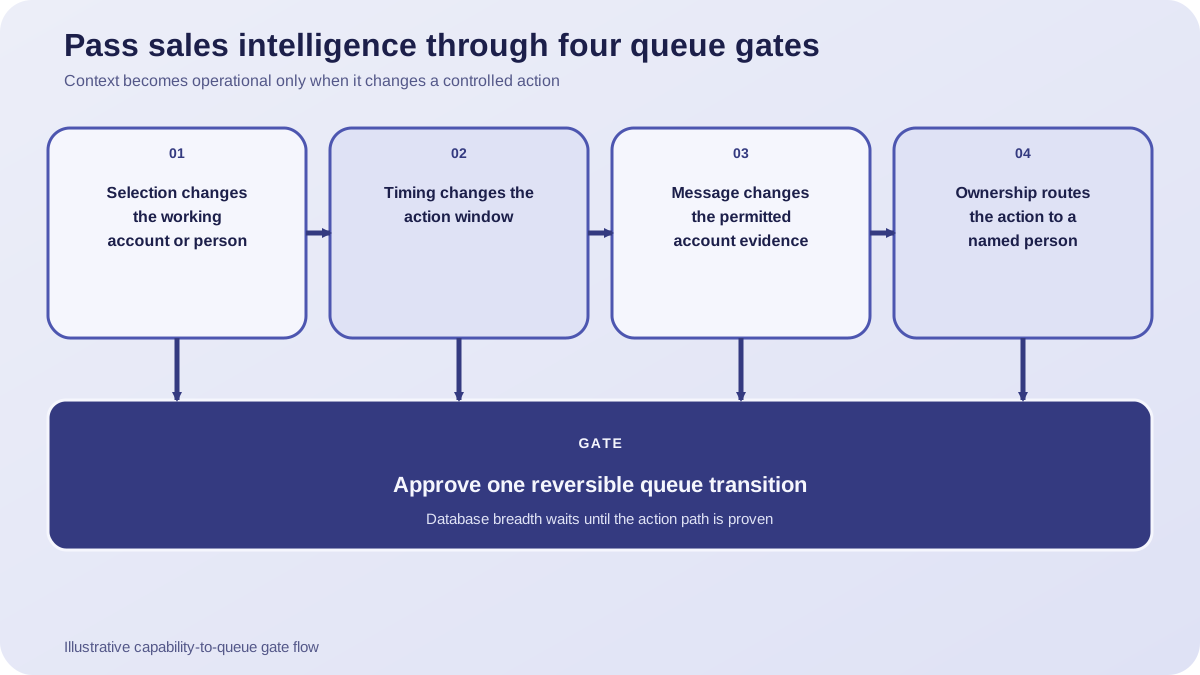
The Four Decisions That Create Queue Value
Selection asks which account or person enters the working set. Timing asks whether evidence changes the action window. Message asks which account-specific fact the rep is permitted to use, rather than merely whether more fields exist. Ownership asks who receives the next step and whether the destination is explicit. These decisions form a strategy because they connect attention to action. A tool can support one, several, or none of them. We should therefore record each capability at the decision it actually reaches. A score export, for example, confirms movement of a score; it does not by itself prove task creation, message generation, owner assignment, or better selling outcomes.
Rank Requirements by Their Distance from the Queue
Once the four decisions are visible, feature priority becomes easier. Start closest to the queue. First ask whether a reviewed condition can create or update a task, route an alert, enter an approved sequence, or update a field that another controlled workflow consumes. Next ask whether the system can select the relevant person or account through a score or filter. Only then ask how much descriptive context is available. Apollo's documentation, checked August 24, 2026, makes this ordering testable: workflows list actions such as sequence entry, task creation, notification, and field updates, while scores can filter people or companies and synchronize with a CRM. The documents establish available mechanics. They do not establish that a score is accurate for your market or that the resulting action improves revenue.
- Queue writeback: Can an approved rule create, update, route, or suppress a next action?
- Decision logic: Can the system expose the score, filter, trigger, and condition behind that action?
- Review control: Can a human inspect and reverse the transition before outreach?
- Context coverage: Which fields support the decision, and which are merely displayed?
This order also defines where a separate company-research workspace such as OKKI Go belongs. Use it after the team has written the selection rule and before a rep treats a candidate as qualified. The governing question remains the same: what evidence should change the queue, and what stays available only for review? Keeping that boundary prevents a research result from becoming an automatic outreach permission.
Translate Every Feature into an Acceptance Test
A feature name is not yet a requirement. Rewrite it as an observable transition. Instead of asking for intent data, ask whether a specified event can move a qualifying account into a named review queue without contacting anyone. Instead of asking for CRM sync, ask which object, field, direction, owner, and failure state are visible. Instead of asking for workflow automation, specify the trigger, conditions, permitted action, suppression rule, and rollback. This translation reveals a common limitation: a provider may document a score or export but remain silent about the downstream action you need. Silence is not a defect by itself, but it is an unknown that belongs in the test plan rather than a capability cell marked yes.
The Hidden Risk Is an Invisible Handoff
Buyers often treat integration as a single checkbox. When you inspect a handoff, ask three field questions: What crossed the boundary? What stayed behind? Could your rep explain why the destination changed? Apollo's Salesforce integration documentation, updated August 19 and checked August 24, 2026, says records and activities can be pushed using configured field and stage mappings. That confirms a configurable handoff. It does not, within the approved evidence, establish every field, every direction of synchronization, the accuracy of source data, or the business result of a pushed record. In our acceptance record, we would mark the mapping as documented and leave data quality, reverse synchronization, and business effect unproven until your pilot observes them. A buying guide should preserve those limits because the operational risk lives between the advertised noun and the exact transition.
We can measure this without inventing a universal benchmark. For each pilot action, record whether the expected object changed, whether it reached the intended owner, whether the reason remained visible, whether a reviewer could suppress or reverse it, and whether duplicate or stale work entered the queue. These are acceptance metrics for your operating design, not claims about provider performance. A high count of enriched fields is not a success metric if the seller still has to reconstruct why the account appeared. A high alert volume can even conceal the question we need answered: which action became more justified?
Test the Handoff, Not the Integration Logo
Build the pilot around one reversible handoff. Choose a known record, a declared mapping, and a destination owner. Run the transition, inspect the resulting record and activity, then change one condition and verify that the queue changes as expected. Finally, remove or suppress the condition and confirm the action stops. This does not prove revenue impact, but it does prove whether the documented mechanism reaches your workflow with an auditable reason. If the supplier cannot show the mapping or the destination state, keep the capability out of the ranked score until it can be verified.
Verify the Supplier with a Next-Account Demonstration
Your supplier demonstration should begin with today's queue, not a tour of menus. Bring a small, labeled set of accounts and state the actions your team permits. Which account enters your queue first? What evidence changed that order? Which exact action reached the named owner? Ask the supplier to answer those questions in the interface and then show the workflow action written back. Apollo's documentation confirms that workflows can create tasks, add people to sequences, send notifications, or update fields. 6sense's alert documentation confirms another testable path: accounts can be ranked by activity count and alerts can be delivered by email or Slack to Owner ID recipients. Checked August 24, 2026, those documents support a demonstration of mechanics, not a prediction that either mechanic will work better for your market. We would not accept a screenshot of the source record as proof of the handoff. Your reviewer should see the destination object, owner, reason, and stop condition together, because each missing element can turn a visible signal into unauditable work. You still have to observe whether the transition survives your rules, records, and ownership model.
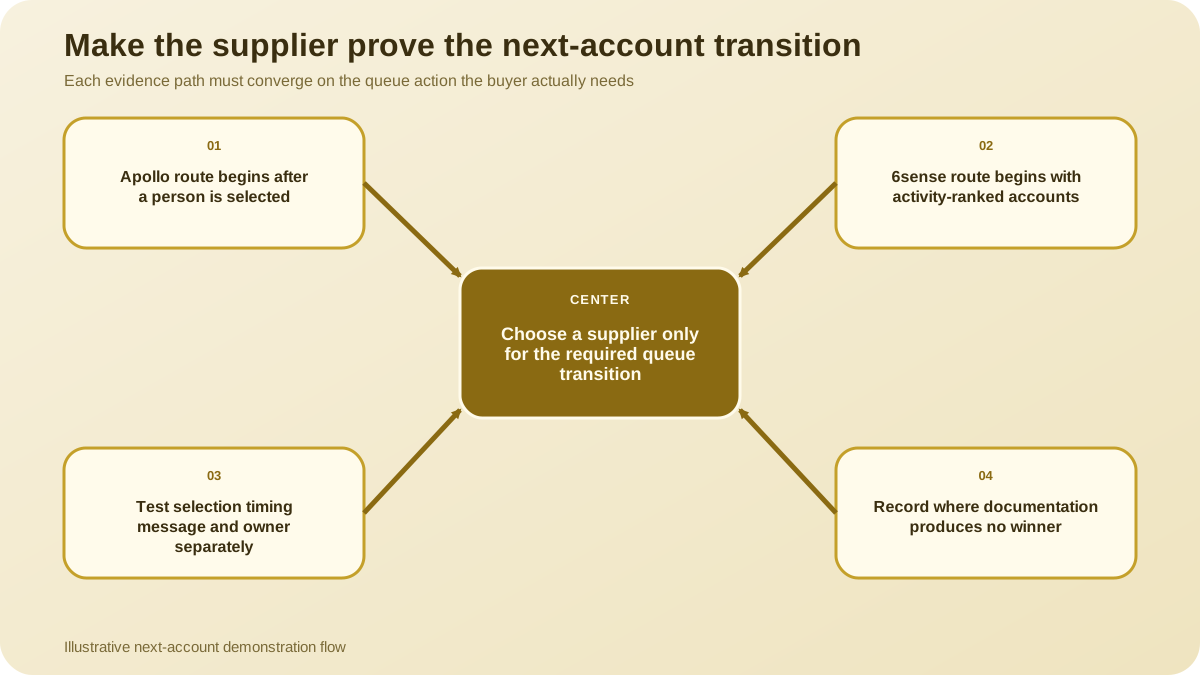
- Selection: 6sense documents ranking top accounts by activity count, so it takes the documented lead when account activity ordering is the required starting point. Apollo's workflow source documents what can happen after a person enters a workflow, not how that person was selected; this S4 comparison therefore leaves Apollo's selection cell to the separately evidenced score analysis above.
- Timing: Apollo documents trigger-and-condition workflows, while 6sense documents email or Slack account alerts. Neither approved source establishes the buyer's freshness window, so neither provider wins this dimension until the pilot shows that a changed condition changes action at the required time.
- Message: Apollo documents sequence entry, but the approved evidence does not establish how message evidence is selected; the 6sense alert source does not establish message creation either. Neither provider earns a documented win for changing the message.
- Owner: 6sense explicitly documents alerts sent to Owner ID recipients. Apollo documents task and notification actions without an owner-routing claim in the approved evidence. 6sense ranks first when explicit owner-linked alert delivery is the deciding requirement.
Imagine your reps keep choosing different accounts from the same morning list. What would you need to see before changing that queue? For the 6sense test, take your labeled accounts, inspect the activity-based ordering, and confirm that the relevant alert reaches the Owner ID recipient. For the Apollo test, supply the chosen person and ask whether an approved trigger and its conditions create your intended task, sequence entry, notification, or field update. Now change the condition: does the downstream action stop or change as your team expected? If your immediate need is account activity ordering delivered to named owners, 6sense ranks ahead on the reviewed sources. If you already have a selected person and need a documented path into a task, sequence, notification, or field update, Apollo ranks ahead. When you need both selection and downstream action, test the handoff between those stages instead of treating either document as proof of an end-to-end chain. In our field note, we would record the winner only beside the transition it actually demonstrated, then leave the adjacent rows unresolved. That prevents your team from turning one documented route into a broad claim about fit. If you need message evidence or a proven action window, the documents do not produce a winner; keep that row open for your controlled pilot.
A Qualification Checklist for Queue Control
The qualification score should reward documented action transitions and preserve unknowns. For selection, ask whether a rule can place a named account into the working set. For timing, ask whether a dated event or alert can change the action window. For message, ask whether the specific evidence used to prepare outreach remains visible to the reviewer. For ownership, ask whether the action reaches a declared person or queue. 6sense documents account ordering by activity count and alert delivery to Owner ID recipients, so those cells can be marked as documented mechanics as of the August 24, 2026 check. The same approved source does not establish message creation or sales outcomes; those cells remain unproven in this audit.
- Selection: documented rule, visible rationale, rejected-account view, and human override.
- Timing: event timestamp, action window, decay or stop rule, and stale-signal handling.
- Message: source evidence visible to the reviewer and a clear boundary against unsupported personalization.
- Ownership: named destination, routing fallback, duplicate handling, and reassignment behavior.
- Control: permission boundary, suppression, rollback, audit trail, and failure visibility.
Do not total these cells as if every team needs the same motion. Weight only the transitions tied to your bottleneck. A territory team with unclear ownership may value routing evidence more than another database field. A team with a stable queue but weak account research may use OKKI Go as a separate reviewed research step, while still requiring its sales intelligence provider to expose why and when an account enters the queue. The tools can occupy different places in the operating chain without being treated as interchangeable.
The Acceptance Checkpoint: One Account, One Reason, One Action
The final acceptance checkpoint is deliberately small. Ask the shortlisted tool to identify today's next account, show the evidence for that choice, and write one permitted action to the correct owner. Can your reviewer explain the transition? Can your operator reverse it? If the supplier can show only a richer profile, keep the capability in your reporting column. If it can show a controlled selection, timing, message, or ownership transition, it has earned a place in your operating ranking. Record the result as a sentence, not merely a score: this condition selected this account, for this reason, and created this action for this owner. The sentence exposes missing links that a weighted spreadsheet can hide. Repeat the demonstration with a condition that should fail, because your ranking system also needs evidence that it can leave an account out. Then repeat it with a different owner or action window. From there, your team can extend the same logic to additional signals without confusing more context with more control. Before you add another capability, ask four questions. Did it change selection, timing, message evidence, or ownership? Was that transition visible to your reviewer? Could your team challenge it? Could the system stop?
The useful sales intelligence ranking begins where context changes a controlled next action. Ask for one account, one reason, and one reversible queue transition.
Frequently asked questions
Which sales intelligence capabilities are directly comparable?
Compare capabilities at the action they reach: selecting an account, changing timing, supplying message evidence, or routing ownership. Do not treat a score, export, alert, task, or field as equivalent merely because each appears in the same product category.
What should a provider disclose before it enters the ranking?
Ask for the trigger, conditions, input evidence, destination object or owner, permitted action, suppression rule, rollback, and visible failure state. Leave a capability unscored when those details are undocumented or cannot be demonstrated.
How should a fixed-cohort pilot test sales intelligence tools?
Use the same labeled accounts and permitted actions for every supplier. Test whether each tool selects the next account, exposes the reason, writes the expected action, routes it correctly, and stops or reverses when a condition changes.
When should a capability stay outside the ranking?
Keep it outside when the approved evidence confirms only adjacent context, when a downstream action is undocumented, or when the supplier cannot show the transition in your workflow. Unknown is more accurate than inferred support.